Logitech MK295 Silent Wireless Combo Review: Quiet Typing, Full-Size Comfort
If loud keyboard clatter and mouse clicks distract you or the people around you, the Logitech MK295 Silent Wireless Combo is built for you. This full-size keyboard and mouse set uses Logitech’s SilentTouch technology to cut noise dramatically, while keeping the familiar typing and clicking feel. In this review we cover its features, battery life, pros and cons, and who it is best for.
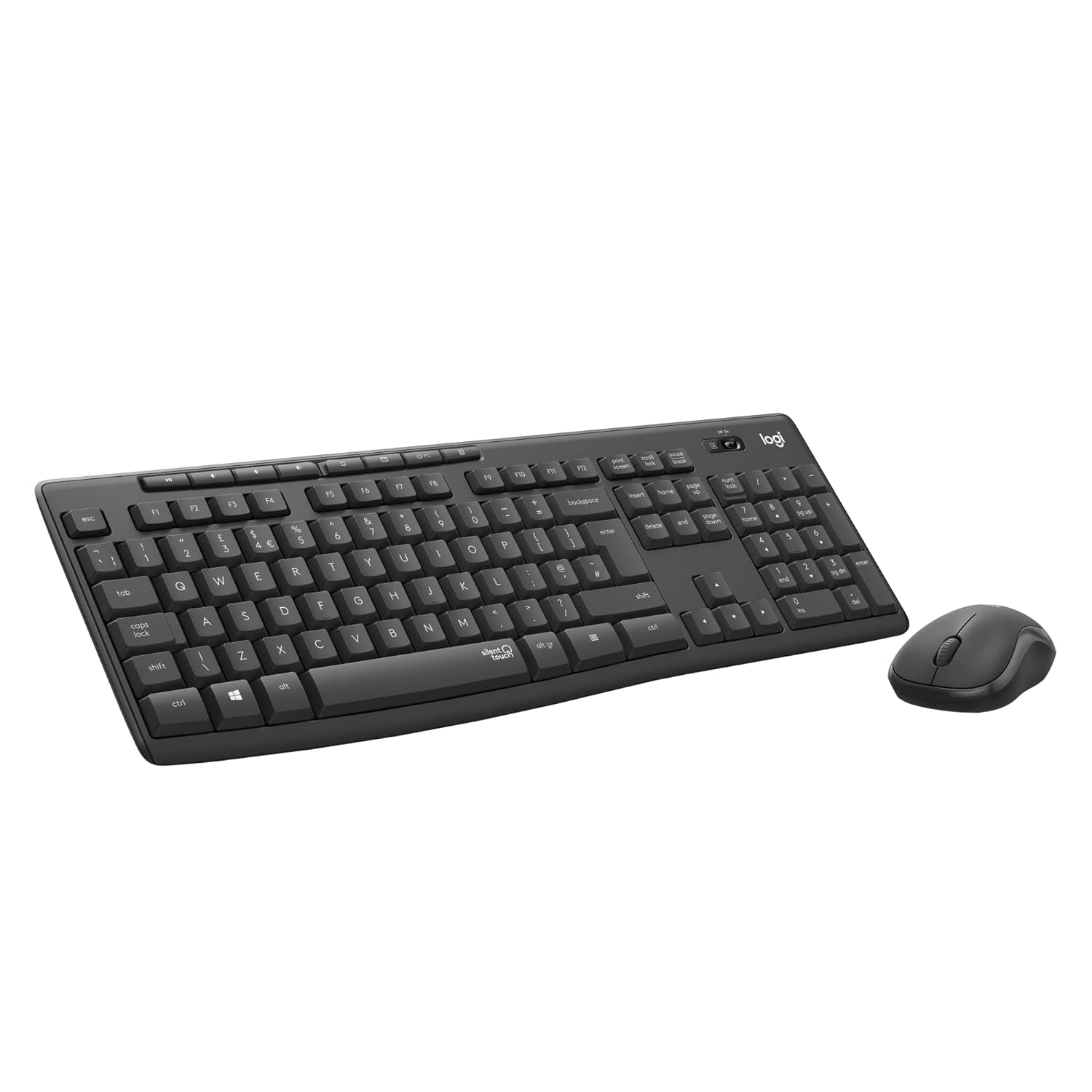
Logitech MK295 at a Glance
- Type: Wireless keyboard + mouse combo
- Noise: SilentTouch technology, over 90% less noise
- Connection: 2.4 GHz wireless via one nano USB receiver
- Range: Up to 10 metres
- Keyboard: Full-size layout with number pad and 8 shortcut keys
- Durability: Spill-resistant design with adjustable tilt legs
- Battery life: Up to 36 months (keyboard, 2 × AAA) and 18 months (mouse, 1 × AA)
- Works with: Windows and ChromeOS
- Warranty: 2-year manufacturer’s warranty
For complete specifications, see the official Logitech MK295 page.
SilentTouch: 90% Less Noise, Same Feel
The headline feature of the Logitech MK295 is SilentTouch technology. Logitech says it removes over 90% of keyboard and mouse noise, yet the keys still have a normal, comfortable press and the mouse still gives a clear click. It is perfect for open offices, shared homes, night-time work and video calls, where a noisy keyboard can be picked up by your microphone.
Full-Size, Comfortable Keyboard
Unlike compact keyboards, the MK295 gives you a full layout, including a dedicated number pad for spreadsheets and billing work. Eight shortcut keys give one-touch access to things like play/pause, volume, mute and email. Adjustable tilt legs let you choose a comfortable typing angle, and the spill-resistant design means an accidental splash of tea or coffee is less likely to end in disaster.

Compact Silent Mouse
The included mouse has a contoured, compact shape that is comfortable for everyday work, and its silent clicks match the quiet keyboard. It is light, easy to carry, and gives smooth, responsive cursor control for browsing, documents and spreadsheets.
Simple Setup and Long Battery Life
Both the keyboard and mouse connect through a single tiny USB receiver, so setup is just plug in and start typing, with no software needed. The keyboard is rated for up to 36 months and the mouse for up to 18 months of battery life, so you will rarely need to change batteries.
Logitech MK295 vs MK470: Which Should You Buy?
Both are quiet Logitech combos, but they suit different needs. Choose the MK295 if you want a traditional full-size keyboard with tilt legs, shortcut keys and spill resistance at a lower price. Choose the MK470 if you prefer an ultra-slim, minimalist design that takes up less desk space. Read our Logitech MK470 Slim Wireless Combo review to compare.
Pros and Cons
What we like
- Over 90% quieter typing and clicking
- Full-size keyboard with number pad and 8 shortcuts
- Spill-resistant, durable design
- One USB receiver for both keyboard and mouse
- Long battery life: up to 36 months (keyboard) and 18 months (mouse)
- Great value for home and office
Things to consider
- No Bluetooth: it needs a free USB-A port (or an adapter)
- Officially supports Windows and ChromeOS only
- No backlit keys
Who Should Buy the Logitech MK295?
- Office workers in open-plan or shared spaces
- Work-from-home professionals who take lots of calls
- Students who study late while others sleep
- Accountants and shopkeepers who need a number pad
- Families looking for a reliable, budget-friendly desktop set
Frequently Asked Questions
Is the Logitech MK295 a keyboard only or a combo?
It is a combo: a full-size wireless keyboard plus a wireless mouse, sharing one USB receiver.
How quiet is it?
Logitech’s SilentTouch technology removes over 90% of keyboard and mouse noise.
What batteries does it use?
The keyboard uses 2 AAA batteries (up to 36 months) and the mouse uses 1 AA battery (up to 18 months).
Is the keyboard spill-resistant?
Yes. It is designed to handle minor liquid spills.
Does it need any software?
No. Plug in the USB receiver and it works straight away.
Final Verdict
The Logitech MK295 Silent Wireless Combo does one thing exceptionally well: it lets you type and click without the noise. Add a full-size layout, spill resistance, long battery life and Logitech reliability, and it is one of the best-value keyboard and mouse sets for quiet homes and offices.